Guide you step by step to How to install and run Backtrack on android. As the Backtrack is also available with ARM architecture which makes it possible to run Backtrack on an ARM machine such as mobiles or tablets.
Recently, We are discussed Install and Run BackTrack on Windows. Android is the best OS for penetration testing. It designed for digital forensics and penetration testing or hacking tool. It comes with many more updated tools. As the Backtrack is also available with ARM architecture which makes it possible to run Backtrack on an ARM machine such as mobiles or tablets.
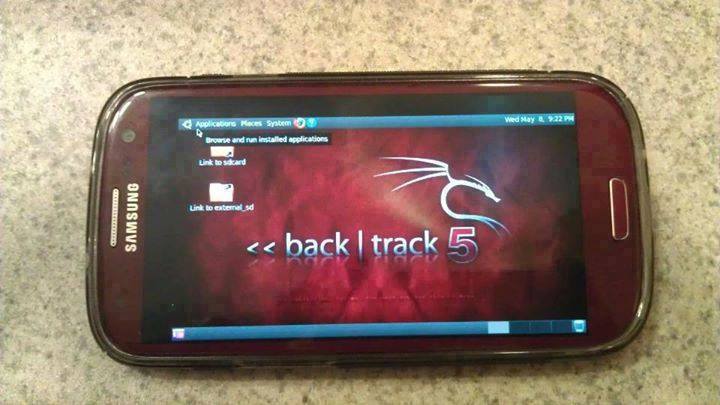
How To Install and Run Backtrack On AndroidRequirements
- A Rooted Device [ Root Simple Android Phone Without Pc ]
- Backtrack ARM [ Download ]
- BusyBox [ Download ]
- Android Terminal and Android VNC
- If you are using PC then you need 7zip for extraction otherwise you can use zarchiver on your android phone. [ Download ]
Step to Install and Run Backtrack On Android:
First of all extract the BT5-GNOME-ARM.7z. and copy the "BT5" folder and then put in your phone's root directory. Here mine phone is /sdcard. The root directory is different for different mobile devices.
- Now install all the above apps Busybox, Android Terminal, Android Vnc.
- After installing BusyBox application open it and wait until it finishes loading and then click on Smart install.
- Now open the android terminal and type the following command:
su cd /sdcard/BT5sh bootbtNOTE :- When you type su in terminal it will ask you for superuser request and you have to tap on Grant. - After this, type the following commands in terminal.
export USER=rootvncpasswd - After entering vncpasswd the terminal will ask you to enter the password. Enter the desired password and hit enter.
- Now type the following commands.
tightvncserver -geometry 1280×720 - The terminal emulator will create the localhost to connect it to VNC server. Now note the localhost port marked red below. Now minimize the terminal emulator.
- Open the Android VNC and type the following settings.
Nickname : BT5
Password : your password here which you entered in terminal (step no.6)
Address : localhost
Port : 5906
Password : your password here which you entered in terminal (step no.6)
Address : localhost
Port : 5906
NOTE: Make sure that your localhost's port matches with terminal's localhost. Here mine New 'X' desktop is localhost:6. You may be different. So, in VNC type Port 590X where the "X" is the localhost in the android terminal.
That's it now just tap on connect to run the Backtrack on your android. So in this way you successfully install and run backtrack 5 on android. If you face any problem feel free to discuss in below comments!
- Blackhat Hacker Tools
- How To Make Hacking Tools
- Pentest Tools Tcp Port Scanner
- Hacker Tools Windows
- Nsa Hack Tools
- Pentest Tools Download
- Hacking Tools Windows
- Hack Tools For Mac
- Pentest Tools Subdomain
- What Are Hacking Tools
- Hack Tools
- Best Pentesting Tools 2018
- Pentest Tools Website Vulnerability
- Pentest Tools Review
- Hacking Tools Free Download
- What Are Hacking Tools
- Hacking Tools Download
- Pentest Tools Windows
- Hack And Tools
- Hacker Tools 2020
- What Is Hacking Tools
- Hacker Hardware Tools
- Hacker Tools List
- Hack Tools For Ubuntu
- How To Install Pentest Tools In Ubuntu
- Hacking App
- Pentest Tools Bluekeep
- Hacker Tools
- Best Pentesting Tools 2018
- Pentest Tools For Windows
- Hacker Tools List
- Install Pentest Tools Ubuntu
- Hacking Tools For Beginners
- Easy Hack Tools
- Hacking App
- Hack Tools For Ubuntu
- Tools For Hacker
- Hack Tool Apk No Root
- Pentest Tools Website
- Pentest Tools For Android
- Hack Tools For Windows
- Hack Tools For Ubuntu
- Pentest Recon Tools
- Hack Tools For Windows
- Top Pentest Tools
- Pentest Reporting Tools
- Easy Hack Tools
- Hack Tools 2019
- Hacker Tools For Pc
- Hacking Tools Pc
- Hackrf Tools
- Hacker Security Tools
- Pentest Tools
- Pentest Tools Open Source
- Hacker Search Tools
- Hack Tools Online
- Hacking Tools Free Download
- Ethical Hacker Tools
- New Hacker Tools
- Hacker Tools 2020
- Hacking Tools Download
- Usb Pentest Tools
- Pentest Tools
- Hacker
- Pentest Tools Nmap
- New Hack Tools
- Top Pentest Tools
- Pentest Tools Subdomain
- Hacking Tools
- What Are Hacking Tools
- Hacker Search Tools
- Hack Tools For Windows
- Install Pentest Tools Ubuntu
- New Hacker Tools
- Hacker
- Pentest Automation Tools
- Beginner Hacker Tools
- Hackers Toolbox
- Pentest Reporting Tools
- Hack Tools For Mac
- Pentest Tools List
- Pentest Tools Android
- Hacking Tools For Games
- Termux Hacking Tools 2019
- Hacker Tools For Ios
- Tools 4 Hack
- Pentest Tools For Ubuntu
- Pentest Tools Free
- Pentest Tools Tcp Port Scanner
- Pentest Tools Url Fuzzer
- Pentest Tools List
- Pentest Tools Find Subdomains
- Hacking Tools For Windows Free Download
- Hacking Tools Kit
- Hack Tools Pc
- Pentest Tools For Windows
- Beginner Hacker Tools
- Pentest Tools Linux
- Kik Hack Tools
- Tools 4 Hack
- Hacking Tools For Windows
- Pentest Tools Windows
- Hacking Tools And Software
- Kik Hack Tools
- Hacking Tools Windows
- Hack Tools For Ubuntu
- How To Install Pentest Tools In Ubuntu
- New Hack Tools
- Hack Tool Apk
- Hacker Tools 2019
- Hack Tools Mac
- Hacking Tools Github
- Tools 4 Hack
- Hacking Tools For Windows Free Download
- Hacker Tools Free
- Hacking Tools For Windows Free Download
- Nsa Hack Tools
- Hacker Tools Apk
- Hacking Tools 2020
- Pentest Tools Online
- Beginner Hacker Tools
- Hacking Tools For Kali Linux
- Hack Tools For Pc
- Hacking Tools For Beginners
- Hacking Tools Windows
- Hacker Search Tools
- Hack Tools For Mac
- Pentest Tools For Windows
- Blackhat Hacker Tools
- Hacker Tools Hardware
- Hacking Tools For Games
- Pentest Tools For Mac
- Hacking Tools 2019
- Blackhat Hacker Tools
- Hack Tools 2019
- Hacker Tools Github
- Hacker Tool Kit
- Hacker Tools For Ios
- Hacker Techniques Tools And Incident Handling
- Hack Tools For Windows
- Hacking Tools Name
- Hack Tools Github
- Hack Tools Pc
- Hacking Tools For Kali Linux
- Bluetooth Hacking Tools Kali
- Hack Tools Pc
- New Hacker Tools

Hiç yorum yok:
Yorum Gönder